
Award-winning Lighting Designer Andy Stagles relies on WYSIWYG to design, visualize, pre-program, and deliver confident results for the Welsh version of The Voice.
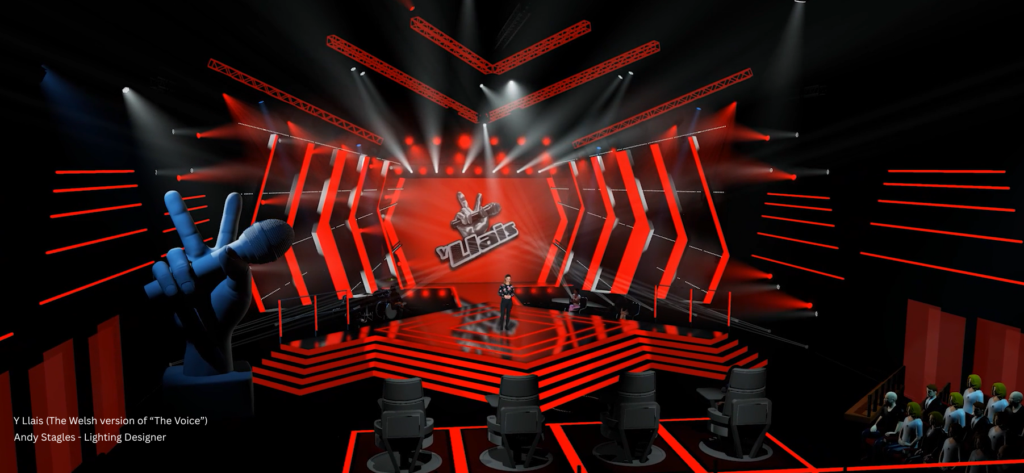
For television productions, time is one of the most valuable resources on set. Rehearsals are tight, schedules are demanding, and the lighting team needs to arrive with a plan that works the moment the rig comes to life.
That is exactly why Andy Stagles, Lighting Designer for Y Llais, the Welsh version of The Voice, continues to rely on WYSIWYG as a central part of his design and production workflow.
“I have used WYSIWYG for the past 16 years. The results are fantastic, and I don’t need to consider using another software brand.” -Andy Stagles
For a show like Y Llais, where musical performances, presenter moments, judges’ looks, video content, and camera requirements all need to work together, WYSIWYG gives Andy the ability to design with confidence long before the set is built.
Designing the Show in 3D Before Production Begins
Andy designs everything in 3D using WYSIWYG. During the design phase, this approach allows him to explore creative directions, test equipment choices, build looks, and collaborate with the set designer and production team.
Rather than asking stakeholders to imagine the final result from drawings or mood boards alone, Andy can show them what the show will look like in the studio environment.
“Seeing what a program will look like before the set is even constructed is a real bonus for a production, and it instills confidence in them as they can see what they are going to get for the budget.”
This early visualization helps production teams make informed decisions sooner. It also brings lighting into the planning conversation earlier, giving everyone more time to review, refine, and improve the final result.
Hear from Andy as he shares why WYSIWYG has become a trusted part of his creative process, helping him design with confidence before the cameras roll.
Pre-Programming Song Looks Before Studio Time
Once songs were confirmed for Y Llais, Andy and his team were able to pre-program each song and send those looks to production for approval. This gave the production team the opportunity to review lighting and video content ahead of time and request changes before arriving in the studio.
That workflow is especially valuable on a music competition show, where rehearsal time with each act can be minimal before they perform in front of the judges.
“Having the main looks already in the desk for each song is a game-changer.”
By loading the console with song looks ready to go, Andy reduces the amount of time needed in the studio. The team can arrive prepared, focus on refinement rather than starting from scratch, and make better use of limited rehearsal windows.
Reducing Risk on a Complex Television Rig
For Andy, WYSIWYG is not only a creative tool. It is also a way to reduce risk.
Designing and previsualizing the rig in advance means he can enter the studio confident that the lighting system will perform as intended. The rig has already been tested virtually, the creative direction has already been explored, and the production team has already seen what to expect.
“Using WYSIWYG enables you to go into the studio confident that the lighting rig will do the job I have designed it to do. It reduces the risk of things not working as planned.”
On Y Llais, Andy also values the ability to bring video content into the screen using MVR, as well as the realism of moving lights working with the console. For a designer working across lighting, video, camera paths, and multi-camera production needs, those tools make the previsualization process more complete and more reliable.
“Being able to MVR the video content into the screen is great — the fact that the moving lights work with the console still amazes me. The shaded view camera paths are also brilliant!”
Saving Time on the Rig, in Rehearsals, and Across Production
The impact of WYSIWYG is felt across the entire production process. It helps Andy communicate ideas earlier, support creative approvals, reduce studio programming time, and deliver stronger results under pressure.
“It saves time on the rig, it saves time in rehearsals and the final result is better!”
For Andy, the value of WYSIWYG comes down to trust. He has spent years mastering the software, building a workflow around it, and using it to create visuals that give clients confidence before production begins.
“WYSIWYG is a great program. I love designing with it, my clients love it, and my clients’ clients love it.”
What You See Is What You Get
The name WYSIWYG stands for “What You See Is What You Get,” and for Andy, that promise is more than just a name. It is the foundation of how he communicates creative intent to clients and production teams.
“I can show my clients how a TV program will look before it goes into production, and I can be absolutely confident that I can tell them that what they are seeing in the visuals is what they are going to get.”
For high-pressure broadcast productions like Y Llais, that confidence matters. WYSIWYG allows Andy to design, visualize, pre-program, and deliver with clarity, helping productions save time, reduce uncertainty, and achieve better results on screen.
About WYSIWYG
WYSIWYG is a multi-award-winning software that delivers an all-in-one lighting and stage plot designer solution. It seamlessly integrates CAD, plots, data, visualization, and virtual show control.
Built for stage and lighting designers, AV companies, and professionals ranging from theater and live performance to film, TV, conferences, and more. It streamlines the entire drawing, design, and pre-visualization process – backed by the largest CAD library available today. WYSIWYG is just what you need to design your show from start to finish.
Try WYSIWYG with a Free 10-Day License
We also offer a 10-day WYSIWYG Perform Lite Free License with full functionality.
This gives you the chance to experience WYSIWYG for yourself, test it in your own workflow, and see how it can support your design, planning, visualization, and production process.