
Create With Confidence. Execute With Precision.

Event Production Solutions with CAST Software

We’re the award-winning developer of live production solutions that bring new possibilities to bear for tracking and production design. Clients throughout the entertainment, special events, and meetings industries know they can count on CAST event production software.

Effortless real-time tracking.

BlackTrax stands out as the best live production software for a wide range of tracking needs. If it moves onstage – whether it’s sound, light, camera, lasers, and much more – BlackTrax can track it.

Working alone or through seamless integration with other event technology tools, BlackTrax keeps track of any speaker, musician, dancer, projected media, or other moving element. Create attendee experiences they’ll never forget.

The definitive entertainment industry software for production design.

Gain full end-to-end control of lighting design and execution with WYSIWYG. Streamlined processes, seamless automation, and the largest CAD library available on the market allow for straightforward design of intricate lighting plots and cues that must be seen to be believed.

Pinpoint-accuracy, real-time camera tracking.

Through seamless integration with BlackTrax, CONVRG brings state-of-the-art automation to onstage PTZ camerawork. Take human error out of the equation and bring consistency to your shooting patterns with ease.

Latest News

Learn about how chart-topping musicians, theater companies, circuses, and countless other organizations achieve the seemingly impossible with our event production solutions.

CAST Software’s BlackTrax real-time tracking system delivered precise, reliable projection tracking for the recent reopening ceremony of Al Ain Museum, an outdoor production widely regarded as one of the most technically demanding ceremonies ever delivered in the region. 

Lights Control Rigging (LCR) is one of the UK’s most respected lighting rental companies, trusted by globally recognized artists and major event producers alike. Among its most ambitious projects is Ed Sheeran’s monumental world tour, a groundbreaking in-the-round production that redefines how audiences experience live performance. 

Cobain’s introduction to WYSIWYG came through his prior experience with technical design tools, and he quickly recognized the advantages of an entertainment-focused platform. “WYSIWYG felt like a natural progression. The workflow is intuitive and has evolved with me.”

Trusted by Industry leaders

From big tech to the fine arts, companies know to trust CAST live event solutions when their finest work needs the spotlight.

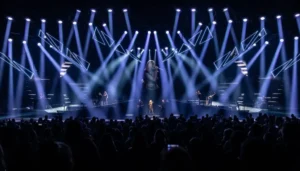
Blue and purple stage lights at a concert.

Integrating Automated Lighting Into Existing Live Event Workflows

TL;DR: BlackTrax brings real time tracking into existing lighting workflows, giving designers greater precision, flexibility, and creative control without requiring a complete change to the production setup. A moving light can pan. It can tilt. It can zoom, iris, and change focus. What it cannot do on its own is know where a performer is in the room. That missing information is where automated lighting comes in. BlackTrax adds real-time positional tracking to an existing lighting workflow, giving compatible moving fixtures the information they need to respond to a performer’s actual position. Instead of programming every possible position a performer might reach, designers can use tracking data to keep fixtures pointed where the action is happening. However, BlackTrax is not simply making a moving light follow a person. It is giving the lighting system access to spatial information that can become part of the creative design. Integrating Automation Without Rebuilding the Lighting Workflow Bringing automation into a live production doesn’t need to mean handing the entire lighting system over to an automated controller. BlackTrax is a lighting automation system designed to work alongside the lighting console. It provides the positional information used to control pan, tilt, focus, zoom, and iris, while the console continues to handle creative parameters such as intensity, color, and gobos. Essentially, the designer decides how the performer should look, while BlackTrax helps determine where the fixture needs to be. Fixtures can also be used for tracking when the production calls for it and returned to normal console control afterward. Existing moving lights therefore become another resource in the lighting system rather than dedicated equipment that can only perform one job. From Traditional Followspots to Automated Followspots A conventional followspot puts an operator between the performer and the light. The operator watches the performer and continually adjusts the fixture to keep the beam where it needs to be. Instead of relying entirely on manual judgment, an automated followspot receives real-time positional information about the subject. BlackTrax can use that information to direct multiple fixtures toward the same performer from different positions. Instead of taking creative control away from designers, this solution actually gives creatives more opportunities and choices. With BlackTrax, a production doesn’t have to depend on a single front followspot location when the rig offers better creative options elsewhere. That could mean front light for one section of a performance, a side angle for another, or several fixtures working together to shape a performer from different directions. For most, automated lighting control improves the design, rather than taking control away from the human artists using these tools. Better Tracking Requires More Than Raw Position Data Knowing exactly where someone is does not automatically produce good lighting. A performer can remain almost stationary while making dozens of tiny movements. They can walk, run, or dance with natural vertical movement. A fixture that responds to every change in position with equal sensitivity can look unstable, even when the tracking data is accurate. BlackTrax includes tools designed to account for this difference between precise tracking and visually effective lighting. AutoSpot Mode AutoSpot Mode is designed to make automated fixtures behave more like a well-operated followspot. It works with Local Damping and Z Damping to help produce smoother tracking rather than simply reacting to every movement captured by the tracking system. Local Damping Local Damping helps BlackTrax recognize small movements around a performer and disregard them when they should not affect the fixture. A performer can shift their weight, gesture, or make another subtle movement without causing the light to appear to shake around them. Z Damping When someone walks or runs, their body naturally moves up and down. Z Damping considers that movement on the height axis and helps keep the light visually stable. The fixture follows the performer rather than visibly reacting to every step. Prediction Even high-quality fixtures do not all respond at the same speed. BlackTrax provides prediction options that account for fixture behavior and help improve tracking performance. In other words, effective lighting automation is not just about knowing where the subject is, but anticipating how the fixture will get there. Expanding What Existing Moving Fixtures Can Do Once tracking becomes part of the lighting system, designers can use moving fixtures in ways that are difficult to achieve with conventional cueing alone. Multiple Tracking Angles A performer does not always need to be treated from the same direction. Multiple fixtures can track the same subject from different positions, allowing the designer to build front, side or back light into the tracking design, which helps when the stage layout, audience configuration or creative concept makes a conventional followspot position impractical. BlackTrax has already been used in productions where the freedom of movement is central to the show. On Eric Church’s Gather Again Tour, for example, the in-the-round stage meant performers were surrounded by the audience, while BlackTrax enabled 64 automated followspots to simultaneously track eight targets. Dynamic Cueing Positional information can become an input for a wider automated production environment. Lighting behaviors can change based on where a tracked person or object is located, allowing the position of a performer to influence what happens elsewhere in the show. That opens up possibilities for reactive cues, interactive environments, and productions where lighting needs to respond to movement rather than simply follow a predetermined timeline. Automatic Beam Sizing The relationship between a fixture and performer changes as the performer moves through the space. A beam that looks right at one distance can become too large or too small at another. Automatic Beam Sizing can use zoom and iris behavior to help maintain a more consistent beam diameter as that distance changes, resulting in a controlled pool of light without requiring the designer to program individual beam adjustments for every position. Offset Tracking With offset tracking, the lighting target can be shifted in XYZ space. A beacon positioned lower on a performer, for example, can be offset so the fixture aims toward the upper body. This gives designers
Read More »

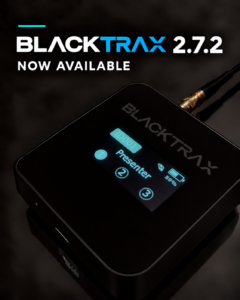
BlackTrax 2.7.2 Now Available 

BlackTrax 2.7.2 introduces support for BlackTrax Core and further improvements to Beacon 2.0 Jam Sync. Alongside key enhancements introduced in 2.7.1, the latest release offers a more accessible way to get BlackTrax and improvements that support reliable operation during live productions.  BlackTrax Core: A More Accessible Way to Get BlackTrax  BlackTrax Core lets you run BlackTrax on your own compatible hardware using a BlackTrax dongle and license, with no dedicated BlackTrax server to purchase.  For productions and venues looking to bring real-time tracking into their workflow, Core lowers the barrier to entry by removing the investment in dedicated server hardware.  With the launch of Core, limits for Sensors, Unique IDs, Outputs and Universes have also been updated for BT-1 and BT-3 customers. The updated limits are available only to customers who have upgraded to BlackTrax 2.7.2. BT-U customers are not affected.  To learn more, visit BlackTrax Core or contact sales@blacktrax.ca for details about Core and the updated limits. Jam Sync for Beacon 2.0: Greater Confidence During Live Shows  Introduced in 2.7.1 and improved in 2.7.2, Jam Sync allows Beacon 2.0 to maintain synchronization independently if it temporarily loses its sync connection to the TimeKeeper.  This helps keep tracking running smoothly through interruptions to that connection, giving operators greater confidence during a live show.  Jam Sync is available through a custom firmware update for Beacon 2.0. Customers with an active software membership can contact support@blacktrax.ca to request the latest firmware.  If your membership has expired, contact the team to discuss renewal and access to this enhancement. Additional Release Highlights  Motive 3.4.1 support: Compatible with and packaged in this update, Motive 3.4.1 includes camera and performance fixes addressing camera startup behaviour, LED controls, and delays when starting recordings or opening files.  Improved battery-status reporting: Introduced in 2.7.1, improvements to Beacon 2.0 battery reporting in Beacon Patch and Live View help operators monitor their Beacons during use.    For assistance with updating your system or accessing the latest Jam Sync firmware, contact support@blacktrax.ca. RELEASE NOTES

Read More »
Show name REFLECTION by Carrie Underwood Nate Cromwell – Lighting Director and BlackTrax Programmer

How Automated Follow Spots Can Transform Live Performances

Automated follow-spot systems replace manual tracking with real-time data, delivering greater precision, consistency, and creative flexibility in live productions. Solutions like BlackTrax elevate lighting from a reactive tool to an integrated, dynamic element of the show. Automated follow-spots give you flexibility and more creative control: In today’s live productions, precision is everything. The rise of the automated follow-spot redefines how that precision is achieved. From global broadcast events to immersive theatrical performances, audiences expect seamless, perfectly timed visuals that move in lockstep with the onstage action. Traditionally, the follow-spot has been critical to live lighting. When operated manually, these powerful fixtures rely on skilled technicians to track and illuminate performers in real time. While effective, this approach comes with inherent limitations. These include operator fatigue, restricted sightlines, and the challenge of maintaining consistency across complex, fast-paced productions. As stages grow larger and productions more intricate, these constraints become increasingly apparent. Designers must create dynamic, responsive environments that demand a higher level of accuracy and flexibility. Enter the automated follow-spot system. By replacing manual operation with intelligent real-time tracking and control, automated solutions are transforming the role of the follow-spot light. A formerly reactive tool is now a proactive element of the show. CAST’s , cutting-edge tracking technology, BlackTrax, stands at the forefront of this evolution. It enables lighting systems to respond instantly and precisely to movement. Understanding the Automated Follow-spot An automated follow-spot brings together tracking technology, intelligent control systems, and high-performance lighting fixtures to deliver consistent, hands-free performer tracking. Unlike a traditional lighting follow-spot, which depends on an operator’s line of sight and manual adjustments, an automated system uses real-time positional data to drive fixtures with pinpoint accuracy. The automated follow-spot system uses three key components. The result surpasses a traditional follow-spot . Automated systems provide repeatable accuracy and allow fixtures to be positioned anywhere in the rig, not just in dedicated follow-spot locations. This opens the door to cleaner sightlines, safer setups, and far greater creative flexibility. In this new paradigm, the lighting follow-spot becomes part of a connected, data-driven ecosystem. This empowers designers to think beyond simply following a performer and toward fully integrating light with motion. BlackTrax: Where Precision Tracking Meets Lighting Control At the heart of the modern automated lighting ecosystem, BlackTrax transforms tracking data into actionable, real-time control. More than a positioning system, it acts as an intelligent bridge between performers and production technology,enabling lighting systems to respond instantly to movement with remarkable accuracy. Using advanced 3D tracking, BlackTrax continuously captures the position of performers and objects across the stage. It delivers this data with ultra-low latency, ensuring that lighting responses feel immediate and natural, even in the most demanding live environments. Integrated directly with industry-standard lighting consoles, the system allows designers to map tracking data to fixture behavior in powerful and flexible ways. This means that any moving light in the rig can function as a responsive lighting follow-spot, without the physical or logistical constraints of traditional setups. Designers can assign multiple fixtures to a single performer for layered looks, or dynamically shift focus between performers as they move. The result is a cohesive, scalable approach that maintains visual consistency while unlocking new creative potential. BlackTrax has proven its reliability across high-profile productions where timing, precision, and repeatability are critical. It delivers confidence to production teams working at the highest level. BlackTrax in Action: Proven on the World Stage Across a wide range of live productions, BlackTrax has demonstrated how real-time tracking can elevate both creative execution and operational efficiency. In large-scale broadcast events, where global audiences scrutinize every cue, you need precise performer tracking. Complex staging, fast-paced choreography, and tight camera coordination demand it. Through automated tracking, production teams can ensure that key moments are always perfectly litwithout relying on manual intervention. In theatrical and cultural productions, technology becomes an extension of storytelling. Performers move fluidly through space, and lighting follows with equal grace, maintaining focus while supporting mood and narrative. Transitions between subjects happen seamlessly, without the need for visible handoffs or repositioning. This keeps audiences fully immersed in the performance. Concert touring presents its own challenges, with artists covering large stage footprints and shows repeating night after night in different venues. Here, consistency is key. With tracking-driven systems, each performance maintains the same level of precision, ensuring that every cue lands as intended, regardless of location. The follow-spot evolves into a flexible tool that adapts to the scale and energy of the show. In corporate and experiential environments, the emphasis shifts to clarity and professionalism. Whether tracking a keynote speaker or guiding attention across a stage, automated systems deliver clean, polished results while integrating seamlessly with broader AV and scenic elements. Expanding Creative Possibilities As automation becomes more deeply integrated into production workflows, the role of lighting expands beyond illumination into full creative expression. With real-time tracking data driving fixture behavior, designers can move past static cues and into dynamic, responsive environments. Instead of relying on a single beam to follow a performer, multiple fixtures can work in unison. This creates layered textures, shifting colors, and evolving intensities that respond directly to movement. This opens the door to effects that feel organic and immersive, as if the lighting itself is part of the performance. Tracking data can also be shared across departments, enabling deeper integration with video, media servers, and scenic automation. A performer’s position can trigger visual content, influence stage elements, or drive spatial effects that extend beyond lighting alone. The result is a more fluid, expressive design language one where light, motion, and media are tightly synchronized. Operational Efficiency & Production Benefits Beyond its creative advantages, automation introduces meaningful efficiencies for production teams. By reducing reliance on manual operation, teams can streamline workflows and reallocate resources to other critical areas of the show. Setup and rehearsal times often drop significantly, as tracking systems allow for faster programming and more predictable results. Once configured, cues can be repeated consistently and accurately, without constant adjustments. This is particularly valuable

Read More »

From First Truss to Final Show: Bringing a Large-Scale Production to Life with WYSIWYG

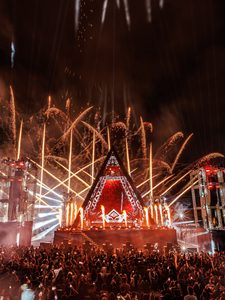
“It became a passion of mine, and from then on, no event ever left my company without first going through WYSIWYG.” — Rodrigo Rocca, Lighting Designer  Lighting designer Rodrigo Rocca has been working in the industry since 1991. Starting his career with analog lighting, Rodrigo credits those early years with giving him a solid foundation for the career that followed.  Planning has always been part of his process. Before delivering an event, he would first create a project, even if, in the early days, that meant starting with a simple drawing.  That process evolved in the mid-2000s when Rodrigo discovered WYSIWYG.  Since then, WYSIWYG has become a fundamental part of the way he approaches his projects. Today, he designs for major festivals, concerts and renowned artists, with experience spanning electronic music festivals, corporate events, product launches, exhibitions, theatre, DVD productions and fashion shows.  That workflow was put to use for Alok’s Pyramid show in Teresina, Piauí, Brazil, a project with a unique set of creative and technical challenges. A Stage Unlike Any Other  For Rodrigo Rocca, what makes the project unique starts with the concept itself: an artist performing from the top of a pyramid made of LED screens, completely covered with lighting and special effects.  Bringing that concept together meant considering much more than the visual design.  The team needed to determine how the structure would fit together, create a stage at the top, plan access points and equipment positions, consider how people would move around the structure, and determine how the artist would safely reach and perform from the top of the pyramid.  As Rodrigo Rocca explains:  “Because the project is so unique, the challenges involved are equally unique.”  The latest version of the structure brought another specific requirement: the pyramid was reconfigured to fit inside a football stadium and to be constructed exclusively from box truss components.  “WYSIWYG was involved from the moment the first truss was placed in the design.”  Making the Structure Fit  One of the biggest challenges Rodrigo Rocca identifies was the limited assembly time compared with the size of the project.  The production involved almost 120 tons of equipment and a large box truss structure. In its latest version, the entire pyramid was constructed using 30×30 box truss, with angled components developed specifically for the project.  WYSIWYG played a fundamental role in developing that structure.  “WYSIWYG was crucial in ensuring everything fit together perfectly angled components were even custom-developed for this project.”  For Rodrigo Rocca, the result was exactly what the team had worked towards: the structure came together and the individual pieces fit as intended.  From Concept to Final Showfile  WYSIWYG wasn’t used for only one stage of the project.  Rodrigo Rocca relied on virtually every major feature available to him, describing WYSIWYG as the central hub of the workflow from the initial concept to the final show file.  “Each module played a specific role in turning an ambitious idea into a production-ready design.”  CAD was used to build the structure and develop the complete technical design from the ground up.  Design allowed Rodrigo to explore different equipment options and evaluate the performance of each fixture within the overall design.  Renderings were used to create realistic previews and validate creative decisions before the build.  Visualization connected the project to the lighting console, allowing the first programming sessions to test movements, beam positions, timing and effects.  Reports generated the technical documentation, fixture schedules and equipment lists needed by the production team.  Patching was used to build the complete patch and deliver a show file ready for programming and deployment on site.  Plots provided the installation drawings, rigging layouts and assembly plans used during load-in.  And the workflow extended beyond lighting.  Before programming a single fixture, WYSIWYG was already being used to develop the structure, validate the engineering and coordinate the technical disciplines involved. Exploring the Design in 3D  The lighting design went through several changes before reaching its latest version.  For Rodrigo Rocca, one of the defining creative decisions was outlining the edges of the pyramid with linear strobes.  Moving lights positioned on the towers formed what he describes as a kind of grid that appears to protect the pyramid, while a moving light embedded directly into the pyramid’s apex projects a beam into the sky.  Lasers also form an important part of the visual experience and are, as Rodrigo Rocca notes, a trademark element of Alok’s shows.  WYSIWYG gave Rodrigo Rocca the ability to experiment with equipment and positioning while developing the design.  “The ability to try out each type of equipment in every possible position and see the result of each one in 3D is perfect.”  “Perhaps that’s what fascinates me most about WYSIWYG: having a complete platform in a single software.” From Visualization to the Final Show  The renderings also allowed Rodrigo Rocca to see a realistic representation of the production before the final show.  Asked how closely the WYSIWYG visualization matched the finished result, Rodrigo said:  “3D renderings and visualizations are really very close to reality, and you can get a very realistic view of what you’ll have in your show, which is why it’s called WYSIWYG.” WYSIWYG also supported the practical side of the production, particularly equipment assembly, positioning, patching and documentation.  He also highlights the ability to export via MVR and make the project compatible with the console and an external visualizer as another important part of the workflow. Photo and video credits: Agência Yotto Bringing Light, Lasers, Drones and Effects Together  The production details Rodrigo shared demonstrate the scale of the show.  The average equipment configuration includes:  Rodrigo Rocca notes that the exact number of fixtures has changed across different versions of the production and continues to vary depending on the size of the space and the audience.  For the show in Teresina, Piauí, Brazil, Rodrigo Rocca reports an audience of 150,000 people.  Among all the elements in the production, there is one sequence that stands out to him.  “When the pyramid interacts with the drone show, everything perfectly synchronized with lighting, visual content and effects is undoubtedly the pinnacle of the spectacle.” When asked what part of the lighting design made him most proud, Rodrigo’s answer wasn’t about one particular fixture or effect.  It was the final result.  “Everything working perfectly, all the pieces falling into place, and the whole team working together to deliver something spectacular!”  For Rodrigo Rocca, productions of this scale

Read More »

Your Best Work Deserves More Than a Hard Drive 

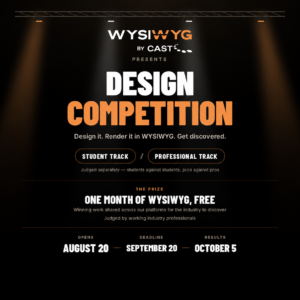
A WYSIWYG design competition for lighting professionals and students. Every year, we see incredible work created with WYSIWYG, beautifully crafted plots and previsualizations that showcase the creativity and technical expertise of our users. Some are students just beginning their journey, exploring where they fit in the world of live entertainment. Others are professionals, quietly producing exceptional designs under the pressure of demanding deadlines.  We wanted to recognize the time, creativity, and effort behind these incredible designs and give the talented people behind them the appreciation they deserve. That’s why we’re launching a design competition, and we’d love for you to be part of it. The premise is simple: design something, render it in WYSIWYG, and send it to us. A panel of industry professionals will judge the entries, and the winners get a month of WYSIWYG Perform (cloud license) plus a real audience for their work.  Two tracks, judged separately  The competition is open to students and to industry professionals, and the two are judged against their own. Students compete against students. Professionals compete against professionals. A first-year lighting student isn’t going to be scored next to someone with fifteen years of touring behind them, which means the student track is genuinely winnable and the professional track is genuinely competitive.  Pick the track that describes you, and enter that one. Professional track open to anyone working in the industry, no minimum years, no credit list required.  Student track open to anyone currently enrolled at an educational institution. To verify, submit your entry from your school-issued email address. That’s the whole proof of enrolment process; we’re not asking for paperwork. If you send your entry from a personal email address, we have to count it as a professional entry rather than a student one. If you need WYSIWYG to design in, students get an educational license free for a full year. It carries the standard educational watermark, which won’t count against you in judging. Full details on the educational license here.  If you’re a student who also works professionally, either track is fair game, pick the one that reflects where you are right now. Just make sure the email address you send from matches the track you’re entering.  What the winners get  If you win the professional track, you get a month of the WYSIWYG Perform (cloud license). Already a subscriber? You add an extra month onto your existing subscription. If you win the student track, you also get a month of the WYSIWYG Perform (cloud license), with no watermarks. It’s a chance to carry your WYSIWYG skills into portfolios, internships, freelance projects, and early-career opportunities with work that looks finished.  Beyond the license, there’s exposure. Winning work gets shared across our platforms, which puts it in front of the designers, production managers, and hiring people who follow us. For a student, that’s a portfolio piece with reach attached. For a professional, it’s your work in front of an audience that understands what they’re looking at.  Key dates Competition Opens: August 20th, 2026 Submission Deadline: September 20th, 2026 Winners Announced: October 5th, 2026 Submissions close at end of day on September 20th at11:59pm EDT. What to submit  Renders must be produced in WYSIWYG and include the current WYSIWYG logo. That’s the one hard requirement, this is a WYSIWYG competition, and the judges want to see what you can do inside the software.  Send your entry to marketing@castgroupinc.com and include: That last one matters more than people expect. The judges are designers. They’re interested in the decisions behind the image, not just the image.  How winners are notified  Winners will be announced across our social channels starting on October 5th, its worth following us, so you don’t miss it. We’ll also email each winner directly at the address they entered from. Questions  Email marketing@castgroupinc.com and we’ll get back to you. If something in these rules is unclear, tell us, it probably means it’s unclear to someone else too, and we’d rather fix the wording than have you guess.  Good luck. We’re looking forward to seeing what you build.  Rights and permissions  By entering the competition, you agree that CAST Group may use your submitted renders/images for promotional and marketing purposes across our website, social media channels, and other CAST communications, and you consent to receive marketing communications from CAST Group. You will retain full ownership of your original work, and appropriate credit will be provided whenever your renders are shared publicly.

Read More »

BlackTrax: Lighting Control, Precision Meets Creative Vision

BlackTrax brings real-time tracking and creative lighting control together, helping production teams keep every cue, beam, and effect aligned with the action. From automated followspots to projection, media, and interactive environments, it helps technology disappear into performance. It means you and your team can:     BlackTrax gives Lighting Designers the freedom to think bigger, move faster, and create moments that feel effortlessly alive. By connecting precise performer and object tracking with lighting control, BlackTrax helps designers ensure that every beam, cue, and effect lands exactly where it should. It can support automated followspots, dynamic lighting looks, projection mapping, media effects, and interactive environments that respond to movement in real time. Instead of asking creatives to work within the limits of manual tracking, BlackTrax allows lighting to follow the performance with accuracy, consistency, and intention. For productions where every second matters, BlackTrax lighting control helps transform technical precision into visual magic. What Is BlackTrax? Real-Time Tracking Built for Creative Control BlackTrax is a real-time tracking solution designed for live production, broadcast, themed entertainment, places of worship, immersive experiences, and complex event environments. The BlackTrax system tracks positions of people, props, scenic pieces, vehicles, and other moving objects, then sends that positional data to connected production systems. In lighting workflows, that data becomes a powerful creative tool. A performer wearing a BlackTrax beacon can move freely across the stage while automated fixtures stay locked to their position. Designers can use BlackTrax tracking to trigger precise follow-spot movement, maintain consistent coverage, or build lighting effects that react to choreography, staging, and blocking in real time. The result is precise automated control, all in the service of creativity. BlackTrax allows production teams to preserve the nuance of a designed lighting look while removing variables like missed followspot pickups, inconsistent timing, limited operator sightlines, or staging that makes traditional tracking difficult. Whether the goal is to highlight a single speaker, follow a fast-moving performer, or synchronize lighting with projection and media, BlackTrax helps the technology disappear into the performance. This makes BlackTrax especially valuable for productions with ambitious creative demands. It gives designers the confidence to build bigger visual moments, knowing the lighting can move with the story. How BlackTrax Lighting Control Works The power of BlackTrax starts with knowing exactly where a performer or object is in the space. First, place a BlackTrax beacon on the person or item being tracked, allowing the system to capture precise movement data in real time. Then, the sensor shares data with connected production systems, including lighting consoles and automated fixtures. For Lighting Designers, this opens up a more responsive way to build a show. Instead of manually chasing a performer across the stage, fixtures can automatically follow their position. A dancer can move through a complex choreographed sequence, a presenter can walk naturally across a keynote stage. Or a character can appear in an unexpected location, with lighting that stays connected to the action. This is where BlackTrax lighting becomes more than automation. Designers can still shape the creative intent of the look — color, intensity, beam size, timing, texture, and mood — while BlackTrax manages the positional accuracy needed to keep the effect aligned. The real-time tracking system can help support automated follow spots, dynamic offsets, and repeatable cueing that follows the performer rather than relying on fixed stage marks. The result is lighting that feels fluid, intentional, and alive. It gives production teams the confidence to design movement-heavy moments without sacrificing precision or consistency. BlackTrax for Automated Follow Spots In many productions, traditional followspots can be limited by operator sightlines, venue architecture, fixture placement, long throw distances, or the speed of the performance itself. Even highly skilled operators can face challenges when performers move quickly, cross paths, or interact with scenic elements. BlackTrax tracking helps solve that problem by allowing fixtures to respond to real-time positional data. When a performer wearing a BlackTrax beacon moves across the stage, the system keeps the light aligned with them automatically. This allows designers to transform existing fixtures in the rig into precise tracking tools, creating follow-spot looks without always relying on dedicated manual spot positions. That flexibility can make a major difference in venues with limited rigging or where creative direction calls for a more cinematic approach. A performer can be isolated in a tight beam, followed through choreography, or picked up at the exact moment they enter a scene. Multiple performers can be tracked across layered staging, helping the lighting support the emotional rhythm of the production. For the audience, the technology disappears. They simply see the right person illuminated at the right time, every time. BlackTrax Performance Benefits for Live Productions A strong BlackTrax performance is not just about accuracy. It is about repeatability, flexibility, and giving creative teams more control over the final experience. In live production, every cue has to work in the moment. There are no second takes, and even a small delay can affect the energy of a scene, song, or reveal. BlackTrax helps reduce such uncertainty. Because the system is tracking movement in real time, lighting can respond to what is actually happening on stage rather than depending only on fixed positions or manual pickups. That makes it especially useful for productions with fast choreography, touring schedules, complex blocking, or moments where performers need the freedom to move naturally. For touring shows, this consistency can be especially valuable. Each venue brings new dimensions, sightlines, and technical conditions, but the creative goal remains the same: deliver the same sense of magic to every audience. BlackTrax can help maintain that standard by giving crews a tracking workflow that supports precision from one performance to the next. It also gives designers room to experiment. When lighting can reliably follow the action, creative teams can build more ambitious transitions, immersive looks, and interactive moments. BlackTrax becomes a practical tool for unlocking bigger ideas while keeping the show controlled, polished, and repeatable. The BlackTrax Tracking Hardware BlackTrax offers a range of tracking hardware designed

Read More »
;;